CISC & RISC Processors
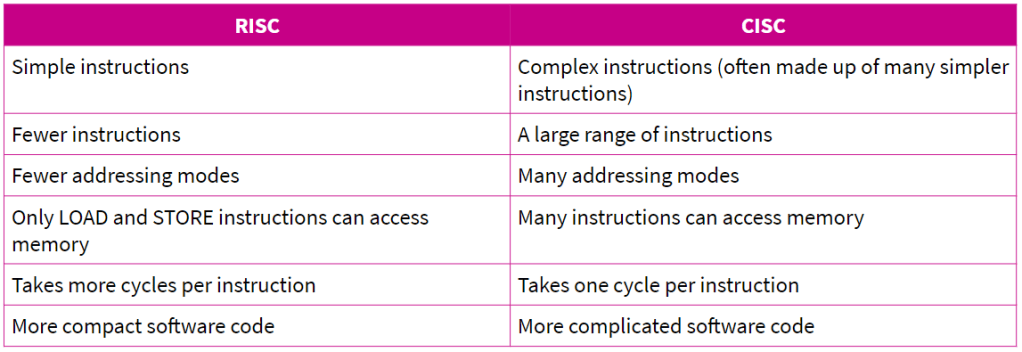
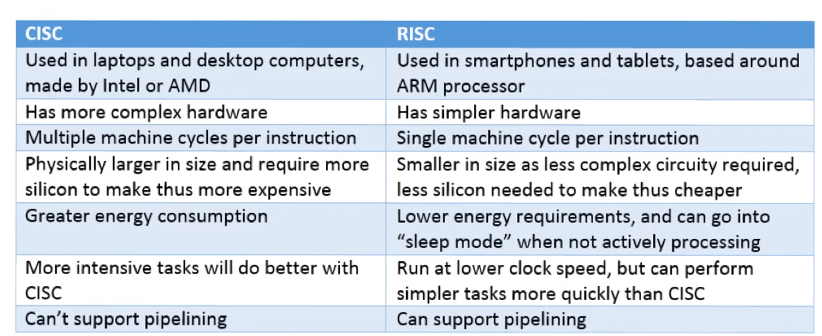
Reduced instruction set computer – (RISC) architectures supports a limited number of simple instructions which can be completed in a single clock cycle, there for individual instructions are executed extremely quickly, but more instructions are needed to complete a given task. RISCs were developed as most computer programs only use a small number of the available instructions (around 20-25%). Creating an architecture that used only the most popular instructions meant much more efficient processing. A side effect of the simpler instructions set is that RISC architectures need a greater number of registers to provide faster access to data when programs are being executed. Another common RISC trait is their memory is accessed through specific instructions rather than as a part of most instructions.
Complex instruction set computer – (CISC) architectures support a large number of complicated instructions. This means that instructions can take many clock cycles to complete, as a single CISC instruction might be made up of a number of smaller RISC-type instructions. Thus, CISCs tend to be slightly slower than their RISC counterparts. However, they can support a much wider range of addressing modes. When many programs were written in Assembly language, CISCs were very popular, as writing programs for them is much easier.
Von Neumann & Harvard Architecture
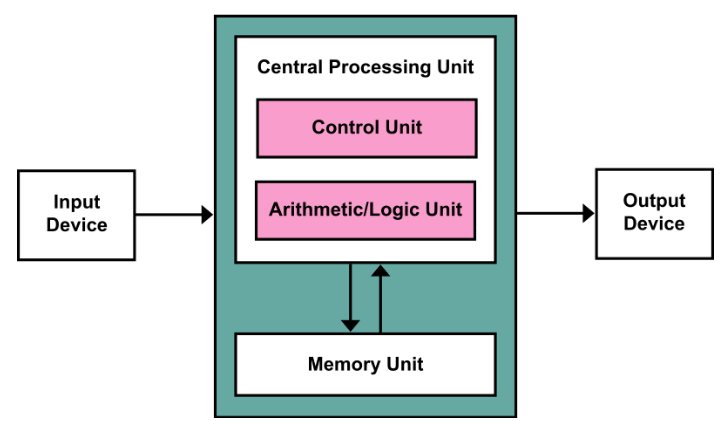
Von Neumann Architecture – The Von Neumann architecture uses the same memory and bus to store both instructions and data. This has the advantage of space and simplicity as only one set of memory addresses is needed however comes with the drawback that as the same bus is used data and instructions cannot be accessed simultaneously and so the system is susceptible to bottlenecks.
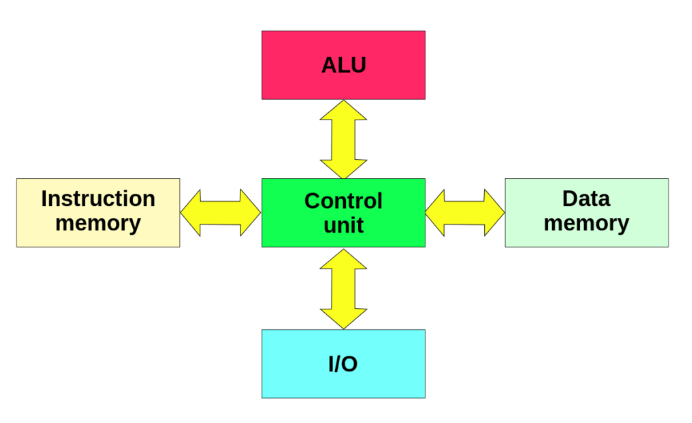
Harvard Architecture – The Harvard Architecture has separate memories for data and instructions this means that the two can be accessed simultaneously via different buses increasing speed but also increasing cost and complexity as the two memories have separate addresses which both need to be accessed.
Multicore Systems – a processors speed in influenced by the number of transistors however when designers ran out of space on the CPU they invented multicore systems. These split the transistors in to separate cores meaning multiple instructions can be performed increasing the speed.
Parallel system – In a parallel system when a task is performed it is split into sub tasks these are then performed simultaneously by all available processors. This greatly reduces the time taken to perform a task however the program needs to be specifically designed to take advantage of this.
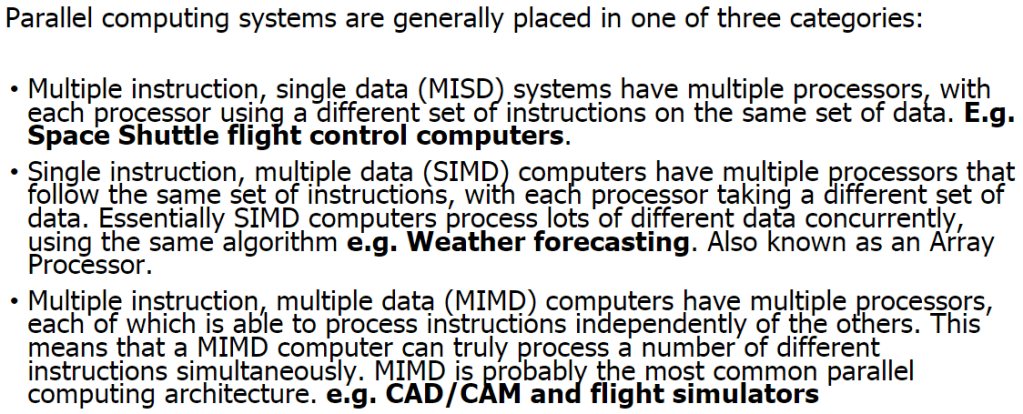
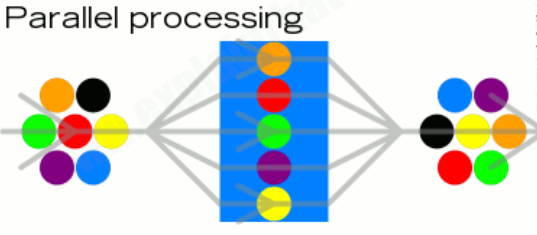
However, the different processors in a multicore system need to communicate continuously with each other in order to ensure that if one processor changes a key piece of data (for example, the players’ scores in a game), the other processors are aware of the change and can incorporate it into their calculations.
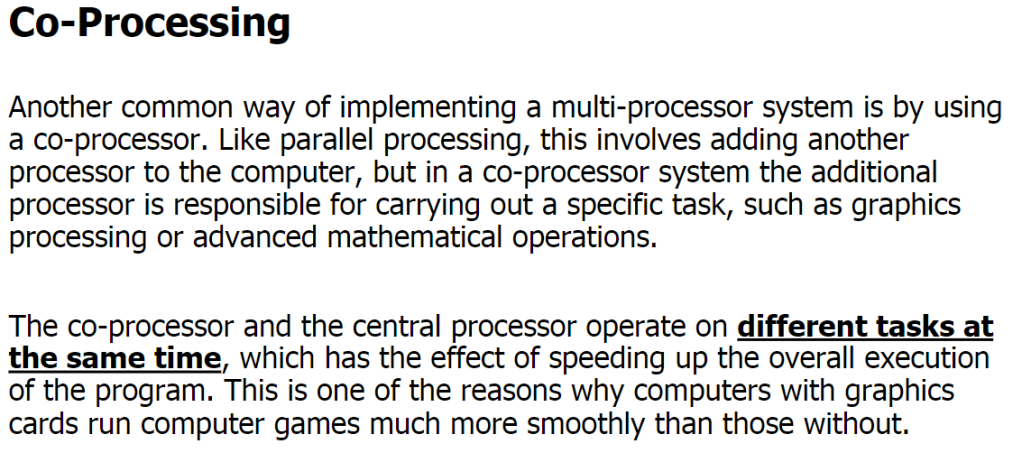
GPUs – graphics processing units are a type of processor (similar to the traditional CPU) that is dedicated to performing the very complex calculations necessary to render graphics. They are a common example of a co-processing system. GPUs are usually located on a separate graphics card and most require their own heat sink to function properly. By taking away the need to render graphics from the main CPU it is freed up to perform other calculations.
Pipelining – Pipelining is an implementation technique where multiple instructions are overlapped in execution. The computer pipeline is divided in stages. Each stage completes a part of an instruction in parallel. The stages are connected one to the next to form a pipe – instructions enter at one end, progress through the stages, and exit at the other end.
Pipelining does not decrease the time for individual instruction execution. Instead, it increases instruction throughput. The throughput of the instruction pipeline is determined by how often an instruction exits the pipeline.
Because the pipe stages are hooked together, all the stages must be ready to proceed at the same time. We call the time required to move an instruction one step further in the pipeline a machine cycle . The length of the machine cycle is determined by the time required for the slowest pipe stage.
The benefit of pipelining is to increase throughput without actually decreasing latency. As a reminder of those terms, their definitions are below.
Latency is the time to complete a single task.
Throughput is the rate at which tasks complete.
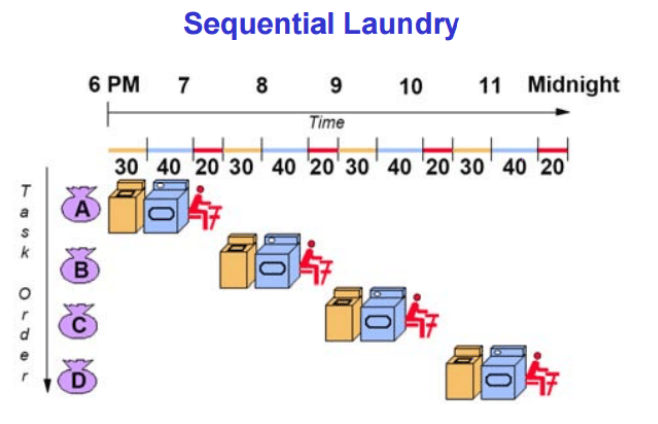
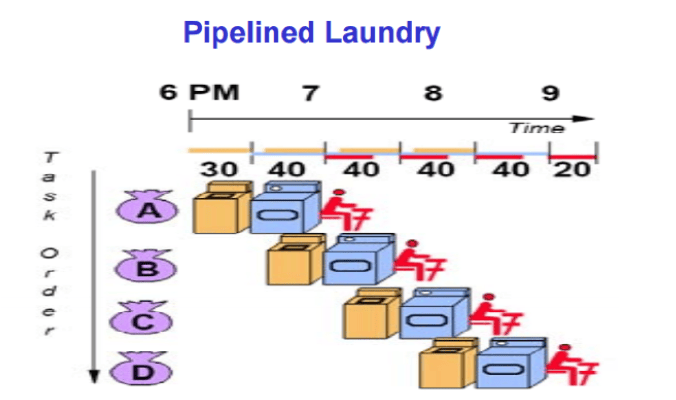
Pipelining is an implementation technique where multiple instructions are overlapped in execution. The computer pipeline is divided in stages. Each stage completes a part of an instruction in parallel. The stages are connected one to the next to form a pipe – instructions enter at one end, progress through the stages, and exit at the other end.
Pipelining does not decrease the time for individual instruction execution. Instead, it increases instruction throughput. The throughput of the instruction pipeline is determined by how often an instruction exits the pipeline.
Because the pipe stages are hooked together, all the stages must be ready to proceed at the same time. We call the time required to move an instruction one step further in the pipeline a machine cycle . The length of the machine cycle is determined by the time required for the slowest pipe stage.

