Input – the raw data from devices entering a system
Output – data that has been processed levying a system.
Storage – Where data is kept.
Inputs For Disabilities –https://docs.google.com/document/d/1t9_IaR60B3ItQiuNYdumMGFWe2D52QfaYIko7q4p6RY/edit?usp=sharing

MICR (magnetic ink character recognition) used to verify the legitimacy or originality of paper documents. Largely by banks to streamline the processing and clearance of cheques and other documents.
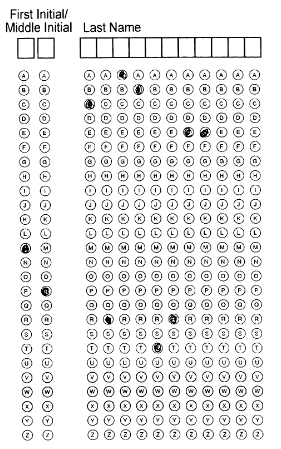
OMR ( Optical mark recognition) is the process of capturing human-marked data from document forms. Used in multiple choice documents UKMT for example. It is limited as the user only gets the choices that are predefined and cannot express their own.
Barcodes are a method of representing data in a visual, machine-readable form. They are read similar to bail as not only what is there but what isn’t must be read. commonly used in supermarkets and warehouses.

RFID (radio-frequency identification) digital data encoded in RFID tags or smart labels are captured by a reader via radio waves. Commonly used in Key fobs. They are reliable however can be replicated and so deceived.
OCR (Optical Character Recognition) is used to scan documents and captures text which is then converted into computer readable data. Can be used to add hand written notes to computers as backups or records.
Scanners are commonly used to digitalis photos or to perform “Optical Character Recognition” (OCR). Once an image has been scanned it is converted into pixels which are stored in binary.
The difference between “sensors” and Actuators” is that a sensor is a form of input gathering data from the surroundings and an actuator is in essence a moving part be that a valve or
hydraulic
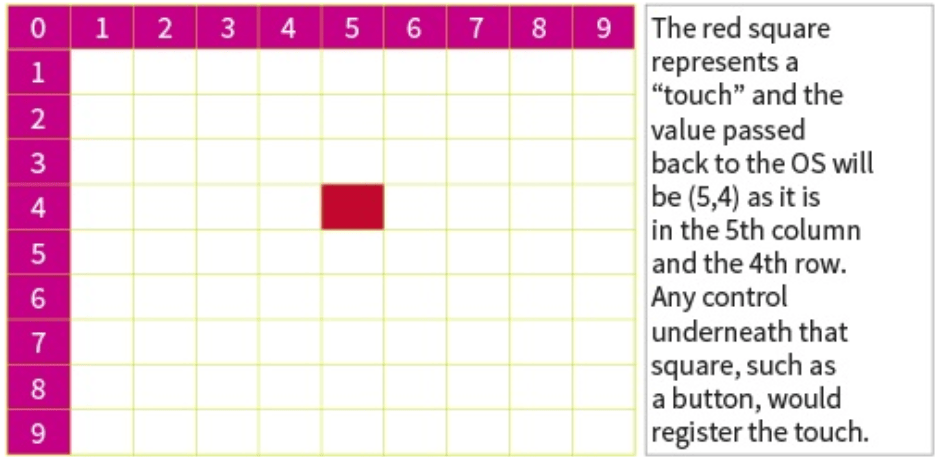
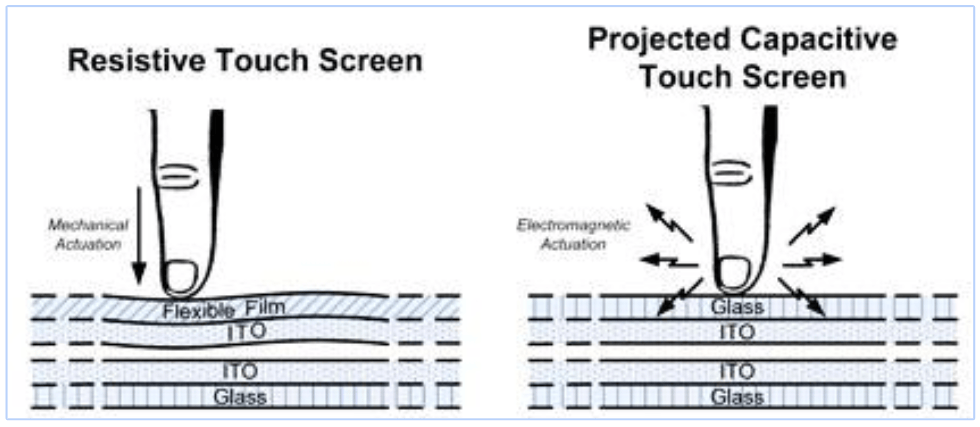
Touch screens – There are two types of touch screen, resistive and capacitive, both versions send the X and Y co-ordinates of the touch to the operating system when a touch is registered.
It works using a grid system, with the screen being split up. The Y-axis increases in value going down rather than up.
Resistive touch screens are much cheaper and are made up of two thin transparent sheets. When these sheets touch each other, a voltage is recorded at that position. A certain amount of pressure is needed to make the sheets touch. These screens do not provide as sharp an image as capacitive screens, nor do they allow for multiple touches. Capacitive touch screens allow for multiple touch points to be recorded simultaneously, making them more expensive than resistive touch screens. Capacitive touch screens make use of the fact that the human body can conduct electricity; when you touch a capacitive screen you change the electric field of the area you touched.

Actuators & Sensors
| SENSORS | ACTUATORS | Use |
| water level sensor | Electronic valve | Shut off water flow |
| Gyroscopic sensor | hydraulic pistons | move control surfaces on planes to stay level |
| Torque sensor | electronic motor | to maintain engine levels |
| accelerometer | electronic latch | deploy the airbag in a car collision |
| Thermistor | buzzer | alert people to changing temperature |
| Vehicle speed sensor | motor | control the speed dial on the dashboard |
| pressure sensor | stepper motor | 3D printer safety measures |
| infrared sensor | motor | open doors as people walk up |
| Rain sensor | motor | close skylights |
RAM & ROM

RAM – RAM is a form of secondary storage and used to sore possesses currently being run by the machine. This includes the operating system, programs being run and things those programs are using. RAM is used as it is much faster than a regular hard drive however it is volatile meaning it loses all data when the PC is shutdown. To be useful, memory cells must be readable and writable. Typically, a RAM device has a set of address lines A0… . Due to this addressing, RAM devices virtually always have a memory capacity that is a power of two. Usually several memory cells share the same address. For example, a 4 bit ‘wide’ RAM chip has 4 memory cells for each address.
:max_bytes(150000):strip_icc()/Amiga_1200_Kickstart_3.0_ROMs-56b429575f9b5829f82c66bd.jpg)
ROM– ROM is a type of non-volatile memory used in computers and other electronic devices. Data stored in ROM cannot be electronically modified after the manufacture of the memory device. Read-only memory is useful for storing software that is rarely changed during the life of the system like boot-up operations for example.
Magnetic Storage, Flash & Optical
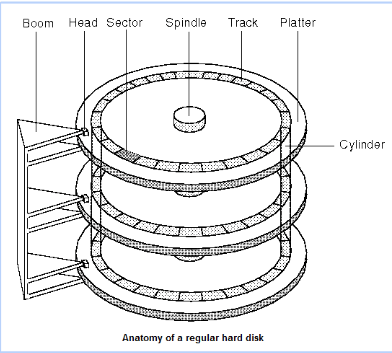
Magnetic Storage – Magnetic storage is ideal for businesses as it has a large amount of storage, is relatively cheap and provides a compromise between storage and accessibility. It works by reading and writing micro magnetic fields on the disc. They are very fragile as the magnetic sensor runs so close to the discs (often tens of nanometers) that even a spec of dust will disrupt it. Originally the magnetic fields ran parallel with the plane of the disc but in more modern ( about 2005) drives they run perpendicular to the plane of the disc. the faster the disc or platter spins, the faster data can be read from the disc. This speed is measured in revolutions per minute, or RPM. A common speed for most hard drives is 7 200 RPM, but it can vary. Hard drives can run at 15 000 RPM, but these are expensive and tend to be used in servers rather than in home computers. The higher the RPM the more energy is required, thus Laptops use slower drives to conserve power.
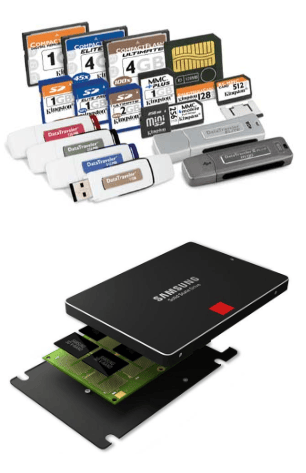
Flash Storage – Flash storage is more expensive however it is also a lot quicker. it works similarly to RAM however it is not volatile and keeps data when powered off. They use a special type of RAM that can retain its state once power has been disconnected. It is known as EEPROM (electronically erasable programmable read-only memory). SSDs tend to have better performance than hard drives, but also tend to be more expensive and have lower capacity. Performance is increased due to the lack of physical motion. There is no spinning disc or moving read head and thus the time it takes to find data on an SSD is much less. Memory sticks and memory cards use flash storage
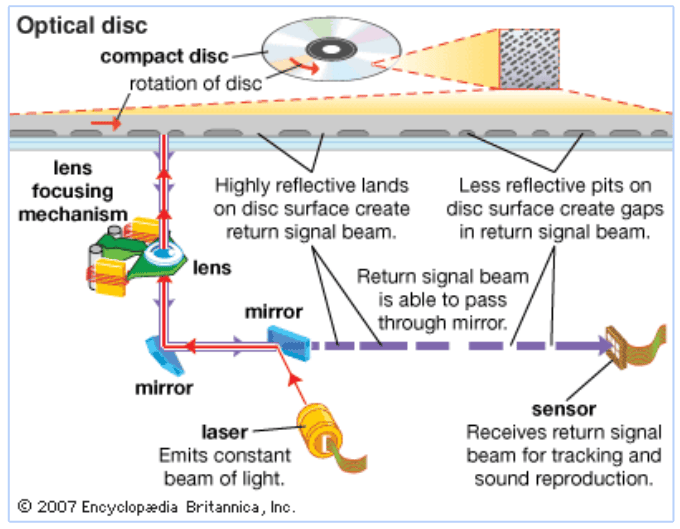
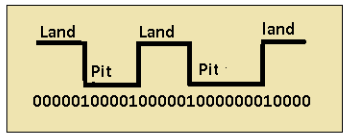
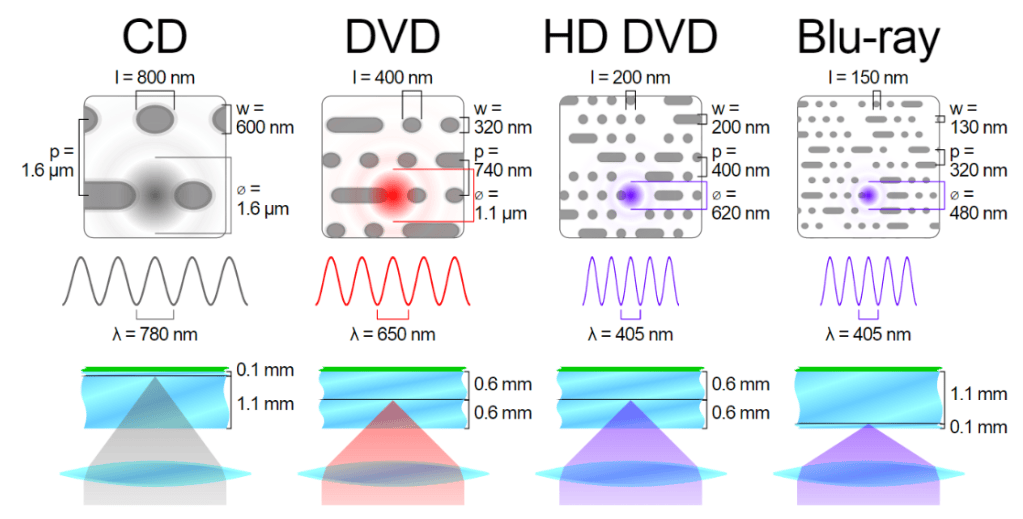
Optical Storage – Optical drives work by using lasers to store data by burning microscopic indentations into a disc such as a CD. This pattern of indentations is created in a spiral pattern, starting from the middle. Indentations and their absence create pits and lands, which are used to store binary data. A laser is aimed at the disc and reflected back, which can cause interference with the original laser. This change in interference is how the optical device can tell the difference between a pit and a land. DVD-ROM do the same but the data is stored on two layers. Two lasers of differing wavelength are used to read data from the two layers. Pits and lands are stored closer together, meaning that the laser’s wavelength must be shorter. CDs tend to be used to store multimedia information or programs, for example DVD movies and music CDs. Programs such as Microsoft Office are distributed on this type of media. The capacity, cost and size of these media make them suitable for storing high-definition data. Blu-ray follows the same principles but uses a laser with a much smaller wavelength. The laser has a distinctive blue colour, which is why it is referred to as Blu-ray. With a smaller wavelength the pits and lands can be much closer together, allowing more data to be stored. CD-R and DVD-R can store multimedia or user data onto CDs or DVDs. When a CD is created, it cannot be modified. As such, it is useful for creating a permanent backup over time. As CDs are physically small, they will not take up too much storage space. Rewritable CDs exist; they allow the user to write to them many times.
Virtual Storage – Most of the storage devices considered so far are mainly intended for use by small systems or individual users. Storage requirements for bigger businesses, are much more demanding. When you have lots of people trying to access the same set of files at the same time more expensive hardware is needed. A simple hard drive will not be sufficient. In order to provide scalability and performance while also being cost efficient, multiple drives that can be brought together to act as a single drive will be needed. Building a custom network-attached storage device (NAS) can be very expensive however it would be cheaper than the alternative of providing good storage for all users. This is known as virtual storage. E.g. The T:\ ‘Topics’ Drive in school .
Redundant Array of Independent Disks – RAID’s are an array of drives put together as one that can be accessed by many computers as part of a network. There are multiple “levels” of RAID starting with 0 going up to usually 5 however there are some models for 6. A model 0 is simply where all the drives are joined together and data is written across all of them. This has the advantage of increasing writing and reading speed as it has a combined speed of all the attached drives however if one drive becomes corrupt then all the data will be lost.
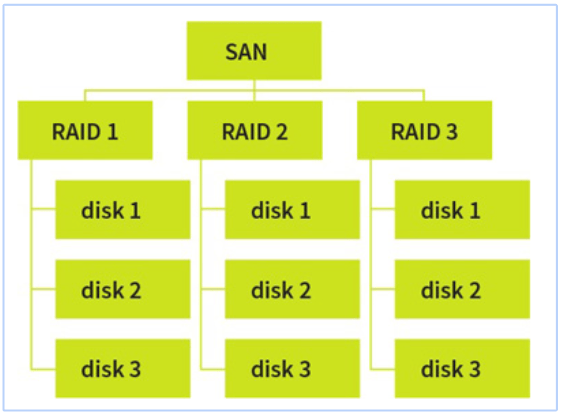
Storage Area Network -(SANs) Although RAID offers good storage solutions for most small networks, storage area networks (SANs) offer more features and much greater scalability. Essentially, a SAN acts as a gateway to a series of block devices, such as RAIDs, and brings them together. A SAN network can be seen as a subnet (small section) of a network that is solely responsible for serving files. Although the SAN treats each connected storage device as a block-level device, it is possible to run SAN file systems that treat all connected storage devices as a single logical drive through a set structure. A key difference is between RAID/NAS and SAN is that SAN generally uses servers whilst RAID/NAS a series of hard drives.
Cloud storage – Cloud storage is a model of computer data storage. The physical storage spans multiple servers (sometimes in multiple locations), and the physical environment is typically owned by a hosting company. These cloud storage providers are responsible for keeping the data available and the physical environment protected and running. People and organizations buy or rent storage capacity from the providers to store user data.

