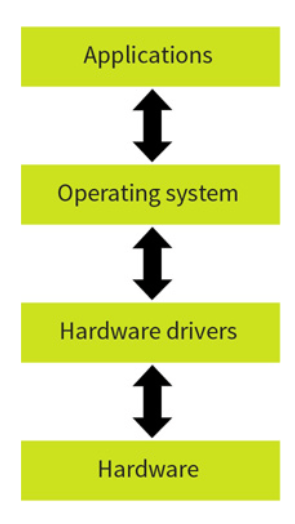
An operating system is system software that manages computer hardware and software resources. It gives the user a more manageable GUI and helps make computers more accessible and usable. Without an operating system using a PC would be incredibly difficult. different operating systems have different file management and types, this makes what operating system you use important if you need specific capabilities. All operating systems however are responsible for the following:
memory management
file management
input and output management
processor time management (scheduling)
providing the human/computer interface
providing system services such as printing spooling
handling all types of error while doing the above.
common operating systems include:
Microsoft Windows
Apple iOS
Apple macOS
Google’s Android OS
Linux Operating System
Linux is the term for a family of open source operating systems based on the Linux kernel meaning different varieties are available with different aims in mind. One common Linux system is Ubuntu which is mainly used for cloud computing
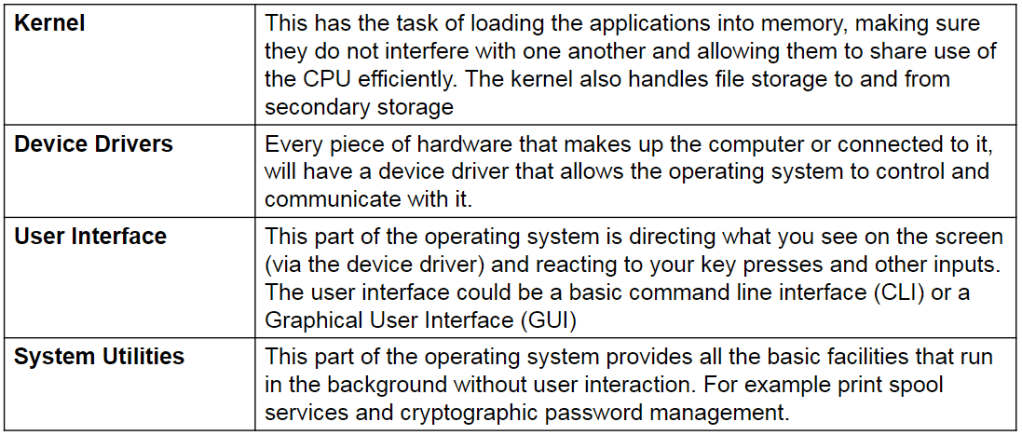
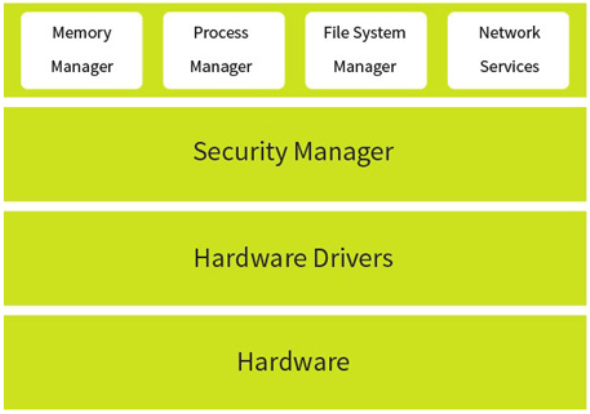
Types of Operating Systems:
Distributed OS provide a virtual machine abstraction to its users and wide sharing of resources like as computational capacity, I/O and files etc. This will be used where inter connectivity would be useful and makes the most of unused resources.
An embedded Operating System (OS) is a specialized operating system designed to perform a specific task for a device that is not a computer. An embedded operating system’s main job is to run the code that allows the device to do its job. The embedded OS also makes the device’s hardware accessible to the software that is running on top of the OS. Some examples of embedded systems are MP3 players
Multitasking, in an Operating System, is allowing a user to perform more than one computer task (such as the operation of an application program) at a time. The operating system is able to keep track of where you are in these tasks and go from one to the other without losing information. All computers will use a form of multitasking Operating System
Multi-user Operating System (OS) is a computer system that allows multiple users that are on different computers to access a single system’s OS resources simultaneously. Users on the system are connected through a network. The OS shares resources between users, depending on what type of resources the users need. The OS must ensure that the system stays well-balanced in resources to meet each user’s needs and not affect other users who are connected. Servers will often run multi-user Operating system.
A real-time Operating System (RTOS) is an operating system intended to serve real-time applications that process data as it comes in, typically without buffer delays.
——
“Using an example, explain why an operating system is essential when running applications on a computer”
One point as to why an operating system is essential is because it has a file management system. this will allow for data to be stored and accessed by the user. Without this it would be a lot harder. For example any data made through applications can be got back by the user however without this
Another reason as to why an Operating System is essential is because it provides a graphical interface. without this using he computer would be considerably harder. For example having to use commands rather than a mouse and cursor
—-
One reason as to why the OS is essential is because it allows the hardware to work with applications by bridging the gap between these. Without the OS applications would not be able to send data to the hardware.
Memory management
Memory management is a form of resource management applied to computer memory. The essential requirement of memory management is to provide ways to dynamically allocate portions of memory to programs at their request, and free it for reuse when no longer needed. This is critical to any advanced computer system where more than a single process might be underway at any time. There are 3 types of memory management:
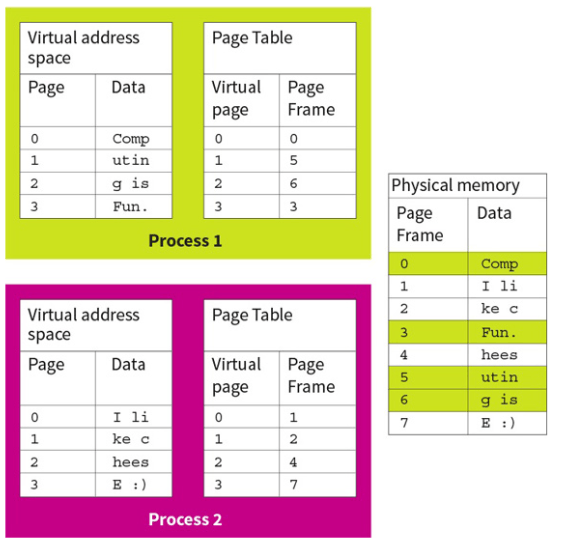
Paging – In this example there are two processes, each with its own virtual memory space. A paging table translates the virtual page number to the physical page held in memory.
For example, page 1 of process 1 stores the text ‘utin’ and the paging table shows that this data is actually stored in page 5 in physical memory.
Individual processes view memory as a continuous block, even though this may not be the case.
Page to frame translation is done transparently to the process; if a process attempts to access addresses outside its paging table, an error occurs. When a page is accessed, the page number requested acts as the index to the paging table to get the real page frame.
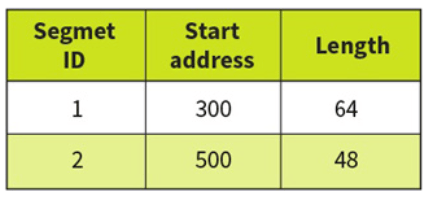
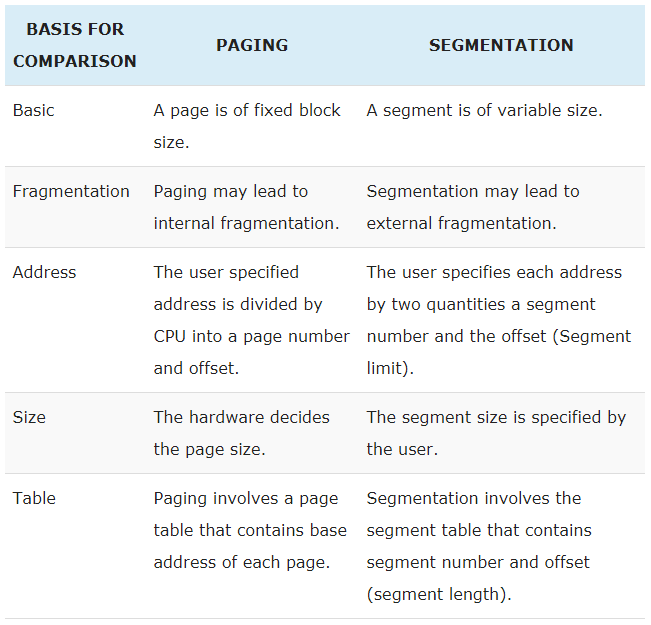
Segmentation -is when main memory is divided into variable sized blocks called segments where each segment corresponds to a program routine (e.g. a subroutine or procedure) or a data structure/array. Segmentation is an alternative method of allocating memory to processes, where segments are variable sized rather than fixed. Thus they can logically split RAM into segments of the exact size requested rather than forcing data into fixed sized chunks. This is ideal when storing blocks of code, such as a library, or files where the size is known in advance. In order to allow variable sized segments, the memory manager must store the length of each segment in the segmentation table.
Each segment corresponds to a logical division of code or data, where all the code or data that is needed is contained within the segment. Each segment is protected so only routines that have the appropriate ‘permissions’ can access it. The segments may be placed anywhere in main memory, but the instructions or data in any one segment are contiguous (sharing a common border; touching). When a different program routine or data is needed, it is loaded as a segment and, if necessary one of the existing segments is replaced. Modern Operating Systems use a combination of paging and segmentation in their memory management.
Virtual Memory – The computer’s operating system, using a combination of hardware and software, maps memory addresses used by a program, called virtual addresses, into physical addresses in computer memory. Main storage, as seen by a process or task, appears as a contiguous address space or collection of contiguous segments. The operating system manages virtual address spaces and the assignment of real memory to virtual memory. Address translation hardware in the CPU, often referred to as a memory management unit or MMU, automatically translates virtual addresses to physical addresses. Software within the operating system may extend these capabilities to provide a virtual address space that can exceed the capacity of real memory and thus reference more memory than is physically present in the computer.

